Page 1 of 1
Define own bullet for lists
Posted: Wed Dec 17, 2025 9:18 am
by Kantonia
Actual project:
https://sonnenastro.de/2026/Sonnenastro2026.zip
How can I define my own bullet and indent for lists?
Re: Define own bullet for lists
Posted: Wed Dec 17, 2025 10:08 am
by Pablo
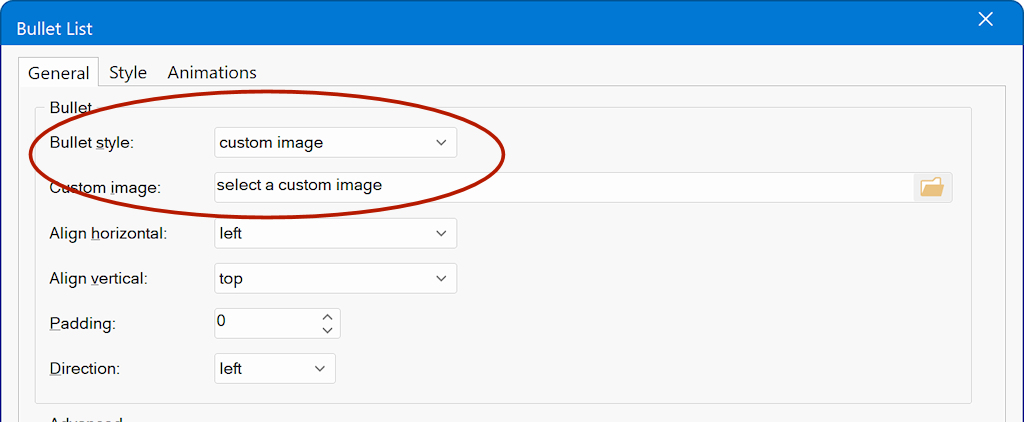
In the 'bulleted list' object you can specific custom images.
You can also use the listview object to implement lists with images.
https://wysiwygwebbuilder.com/support/w ... tview.html
Re: Define own bullet for lists
Posted: Thu Dec 18, 2025 10:40 am
by Kantonia
Unfortunately I didn't find what I was seeking for.
I wish ✪ instead of the black point in unnumbered lists. This sign is from your list of symbols, not a picture.
How should I go on?
BW
Kantonia
Re: Define own bullet for lists
Posted: Thu Dec 18, 2025 11:26 am
by Pablo
Re: Define own bullet for lists
Posted: Thu Dec 18, 2025 11:43 am
by Kantonia
Hi Pablo,
When I klick on "Bullet list" - which I see only in the items listed in the Toolbox on the right side of the screen - nothing happens.
Re: Define own bullet for lists
Posted: Thu Dec 18, 2025 12:29 pm
by Pablo
Adding a Bullet list is not different then adding any other object.
Just drag & drop it to work place.
Re: Define own bullet for lists
Posted: Thu Dec 18, 2025 12:35 pm
by Kantonia
I didn't use this feature before.
It works now.
Thank you.
Re: Define own bullet for lists
Posted: Fri Dec 19, 2025 9:45 am
by Kantonia
Hello,
it works, but that's not really what I wanted. It is somewhat laborious. In my old page I had a simple statement in the CSS-File
ul { text color: navy;
list-style-image: url(button.jpg);
}
Whenever I clicked on the list-button in the text menu, I got the defined list style. Is that possible in WBB too?
BW
Kantonia
Re: Define own bullet for lists
Posted: Fri Dec 19, 2025 10:07 am
by Pablo
Any code that works elsewhere, will also works in WWB. However, there is no 'visual' way to implement this code.
Re: Define own bullet for lists
Posted: Fri Dec 19, 2025 10:22 am
by BaconFries
You can use the following to add the code.
HTML Object Unlike your previous software Nano WWB is not a HTML Editor but a HTML Generator meaning the HTML doesn't exist till published. But with the likes of what I linked to you can you yourself add any code you may need.
Re: Define own bullet for lists
Posted: Fri Dec 19, 2025 11:08 am
by Kantonia
This is not HTML. And it has nothing to do with Namo. It is a CSS statement I added manually with a simple editor to my CSS file.
Re: Define own bullet for lists
Posted: Fri Dec 19, 2025 11:51 am
by BaconFries
It is a CSS statement I added manually with a simple editor to my CSS file.
Then if that is the case and you have saved the css generated by the software as a external file then you can open it in any external editor and add the snippet. Note the downside to this is if you then open again in WWB to make changes to the page then css file with the snippet will get overwritten and you will need to add again
Re: Define own bullet for lists
Posted: Fri Dec 19, 2025 12:22 pm
by Kantonia
But WBB has problems with CSS files anyway. In my neomarica-site there are already 20 (!) CSS files. I have the idea that every publishing let it make new CSS files.
Re: Define own bullet for lists
Posted: Fri Dec 19, 2025 12:43 pm
by Pablo
I have the idea that every publishing let it make new CSS files.
This statement is incorrect.
The software will only generate CSS file is you tell it to do so. it will not generate files that are not needed.
Re: Define own bullet for lists
Posted: Fri Dec 19, 2025 12:55 pm
by Kantonia
I never told the software to do something in direction of CSS. I never altered the basic settings.
Re: Define own bullet for lists
Posted: Sat Dec 20, 2025 10:57 am
by Pablo
You can control the out format in Tools -> Options -> HTML
I never told the software to do something in direction of CSS. I never altered the basic settings.
What I meant, is that if you do not add any elements to the page then no CSS will be added.
The more elements you add the more code will be generated...
If you need further assistance then please share a DEMO project so I can see what you have done. See also the forum rules.
Re: Define own bullet for lists
Posted: Sun Dec 21, 2025 7:22 pm
by Kantonia
Pablo wrote: Sat Dec 20, 2025 10:57 am
If you need further assistance then please share a DEMO project so I can see what you have done. See also the forum rules.
I did that at the beginning of the thread:
viewtopic.php?p=505904#p505904
Re: Define own bullet for lists
Posted: Sun Dec 21, 2025 8:57 pm
by Pablo
I'm sorry, but this is not what I asked for.
For further details about how to share a project file, please see this FAQ:
https://www.wysiwygwebbuilder.com/forum ... 10&t=82134
Re: Define own bullet for lists
Posted: Mon Dec 22, 2025 7:29 am
by Kantonia
Hallo Pablo,
I do not need further assistance at the moment. I just made a comment about WBB's weird handling of CSS files. I was used to have one or two for the whole webside. WBB makes one for every page. That's contradicts the idea of CSS.
Have fine holidays!
Kantonia
Re: Define own bullet for lists
Posted: Mon Dec 22, 2025 11:57 am
by Pablo
You can configured how CSS files will be generated in Tools -> Options -> HTML
You can have one file for all global styles or choose to include it in the HTML itself.
Note that there is no way to place all CSS of the entire website in one file because then you will most certainly run into conflicts.
The software has thousands of options and millions of possible combinations with hundreds of embedded third party scripts and functionality. And even more if you install all extensions.
So in my opinion, the behavior is not 'weird', it is logically for an advanced tool like this.
Re: Define own bullet for lists
Posted: Mon Dec 22, 2025 1:24 pm
by crispy68
@kantonia,
I was used to have one or two for the whole webside
To me that wouldn't be practical. If I had 100 page website and all of the CSS was in 1 file, each time a page was loaded it would have to load that entire CSS file each time which would be huge. It would be loading css styles that aren't even for that particular page. You can have global styles set up that contains styles on all the pages and then have only the css files for each page. This makes loading of pages much quicker.
Re: Define own bullet for lists
Posted: Mon Dec 22, 2025 2:24 pm
by Kantonia
crispy68 wrote: Mon Dec 22, 2025 1:24 pm
@kantonia,
I was used to have one or two for the whole webside
To me that wouldn't be practical. If I had 100 page website and all of the CSS was in 1 file, each time a page was loaded it would have to load that entire CSS file each time which would be huge. It would be loading css styles that aren't even for that particular page. You can have global styles set up that contains styles on all the pages and then have only the css files for each page. This makes loading of pages much quicker.
It's a question of efficient working. I come from a time when webspace was limited and expensive. My CSS files never were mor than 3 k.