Page 1 of 1
A little help.
Posted: Sun Mar 15, 2026 7:53 pm
by Joker7
Thanks for the help so far.
I have been trying to recreate my website, it's getting there.
I have one wee problem, trying to get the page size a image slider to fit as in my old site.
All tips and ideas welcome.
You can see the different here, what I'm trying to achieve
www.puy-robin.com and this is what I have done
www.puy-robin.com/testsite .
As you can see it's not quite there yet...
Re: A little help.
Posted: Sun Mar 15, 2026 8:37 pm
by Pablo
If you are using layout grids then you can drag the carousel inside a grid to make it full width.
The different layout methods are explained here:
https://wysiwygwebbuilder.com/layout_modes.html
Re: A little help.
Posted: Sun Mar 15, 2026 11:51 pm
by onlye
Looks like you are coming along nicely.
Re: A little help.
Posted: Mon Mar 16, 2026 8:53 am
by Joker7
Thanks guys for the fed-back so far.
Struggling with the responsive side of things are there any video/youtube guilds, I'm getting bogged down reading all the different tutorials.
Having a break from it today to work on the tractor...
Re: A little help.
Posted: Mon Mar 16, 2026 10:06 am
by alan_sh
Responsive can be as simple as putting the objects inside a layout grid and letting that sort everything out.
What issues are you having?
Alan
Re: A little help.
Posted: Mon Mar 16, 2026 11:44 am
by Joker7
Hi,
At the moment making text menu navigation responsive.
It's all a big learning curve..
Re: A little help.
Posted: Mon Mar 16, 2026 12:41 pm
by Pablo
If you need help, then please share a DEMO project (not the full project) and describe what you are trying to do.
For further details about how to share a project file, please see this FAQ:
https://www.wysiwygwebbuilder.com/forum ... 10&t=82134
Re: A little help.
Posted: Mon Mar 16, 2026 3:21 pm
by alan_sh
Joker7 wrote: Mon Mar 16, 2026 11:44 am
Hi,
At the moment making text menu navigation responsive.
It's all a big learning curve..
For the text menu, try setting full width to True in the Style tab. And put it inside a layout grid.
As Pablo says, provide a demo project with the issue in it (and not much else) and we can have a look.
Alan
Re: A little help.
Posted: Mon Mar 16, 2026 3:25 pm
by Joker7
Hello,
I'm trying to copy my site at
www.puy-robin.com.
The more I use the software the more frustrating becomes, I'm stuck on the responsive elements.
I'm using flexgid
Things I need to overcome:
The text menu - I can not get this to be responsive
The slider - This will not sit right.
Of for me tea now..
Ps: forgot the link.
https://freeaj.byethost5.com/slidder/
Re: A little help.
Posted: Mon Mar 16, 2026 3:41 pm
by Pablo
If you are just starting the I recommend to use layout grid. They are easier to manage.
Step 1
Add a layout grid
Step 2
Drag the carousel inside the layout grid.
If you need further assistance then please share a DEMO project.
Re: A little help.
Posted: Mon Mar 16, 2026 4:06 pm
by alan_sh
Same with text menu - also see my incorrect bug report.
Alan
Re: A little help.
Posted: Mon Mar 16, 2026 5:10 pm
by Joker7
Pablo wrote: Mon Mar 16, 2026 3:41 pm
If you are just starting the I recommend to use layout grid. They are easier to manage.
Step 1
Add a layout grid
Step 2
Drag the carousel inside the layout grid.
If you need further assistance then please share a DEMO project.
Will that be responsive?
Re: A little help.
Posted: Mon Mar 16, 2026 5:14 pm
by alan_sh
Joker7 wrote: Mon Mar 16, 2026 5:10 pm
Pablo wrote: Mon Mar 16, 2026 3:41 pm
If you are just starting the I recommend to use layout grid. They are easier to manage.
Step 1
Add a layout grid
Step 2
Drag the carousel inside the layout grid.
If you need further assistance then please share a DEMO project.
Will that be responsive?
Yes, I just tried it.
Alan
Re: A little help.
Posted: Tue Mar 17, 2026 7:54 pm
by Joker7
alan_sh wrote: Mon Mar 16, 2026 5:14 pm
Joker7 wrote: Mon Mar 16, 2026 5:10 pm
Pablo wrote: Mon Mar 16, 2026 3:41 pm
If you are just starting the I recommend to use layout grid. They are easier to manage.
Step 1
Add a layout grid
Step 2
Drag the carousel inside the layout grid.
If you need further assistance then please share a DEMO project.
Will that be responsive?
Yes, I just tried it.
Alan
Think I must be missing something - as I can't get it to work..
This is not going well and no-way as easy as expected from you presales fed back.
Re: A little help.
Posted: Tue Mar 17, 2026 8:38 pm
by Pablo
Step 1
Add a layout grid
Step 2
Drag the carousel inside the layout grid.
There are only two steps.
Where does it go wrong for you?
What exactly does not work?
Do you have a DEMO project so I can see what is wrong?
Re: A little help.
Posted: Tue Mar 17, 2026 10:21 pm
by alan_sh
Joker7 wrote: Tue Mar 17, 2026 7:54 pm
alan_sh wrote: Mon Mar 16, 2026 5:14 pm
Joker7 wrote: Mon Mar 16, 2026 5:10 pm
Will that be responsive?
Yes, I just tried it.
Alan
Think I must be missing something - as I can't get it to work..
This is not going well and no-way as easy as expected from you presales fed back.
Joker, this is the wbs file I used. Unzip it, there will be a file and a folder. Open the file in WWB and you should be able to see and test it.
https://www.dropbox.com/scl/fi/z2hzqp19 ... prpki&dl=1
regards
Alan
Re: A little help.
Posted: Wed Mar 18, 2026 11:43 am
by Joker7
Pablo wrote: Tue Mar 17, 2026 8:38 pm
Step 1
Add a layout grid
Step 2
Drag the carousel inside the layout grid.
There are only two steps.
Where does it go wrong for you?
What exactly does not work?
Do you have a DEMO project so I can see what is wrong?
OK this is whats I get.
It is covering the menu not really responsive...
https://freeaj.byethost5.com/tr456
Not finding the software very drag and drop art the moment...
Re: A little help.
Posted: Wed Mar 18, 2026 12:07 pm
by Joker7
alan_sh wrote: Tue Mar 17, 2026 10:21 pm
Joker7 wrote: Tue Mar 17, 2026 7:54 pm
alan_sh wrote: Mon Mar 16, 2026 5:14 pm
Yes, I just tried it.
Alan
Think I must be missing something - as I can't get it to work..
This is not going well and no-way as easy as expected from you presales fed back.
Joker, this is the wbs file I used. Unzip it, there will be a file and a folder. Open the file in WWB and you should be able to see and test it.
https://www.dropbox.com/scl/fi/z2hzqp19 ... prpki&dl=1
regards
Alan
Thanks Alan for you response, it's appreciated.
I can't see how the layout in the editor corresponds to what’s seen on the web, this is probably where I'm not understanding how the editor works.
https://freeaj.byethost5.com/trimage/Editor.png
https://freeaj.byethost5.com/trimage/web.png
Chris
Re: A little help.
Posted: Wed Mar 18, 2026 12:08 pm
by BaconFries
When it is asked of you to share/show a "Demo" it is a "Copy" of the .wbs file (project) and not a link/url to the page you have issues with this is because just viewing the source of the html doesn't help. So loading your project .wbs shows us what you have or haven't done.
How do I share my project to get help?
Re: A little help.
Posted: Wed Mar 18, 2026 12:20 pm
by Pablo
Based on the website, you did not place the elements inside the grid.
They are just randomly placed on the page. They need to be inside the grid to become flexible.
This works the same as with any other responsive design tool. The difference with other tools is that WWB gives you more control because it supports several different layout modes, instead of just one.
Your current website uses Bootstraps which also uses grids. it's the exact same concept!
You can learn about the basics of layout grids here:
https://wysiwygwebbuilder.com/layoutgrid_part1.html
https://wysiwygwebbuilder.com/layoutgrid_part2.html
Also, note that most templates use layout grids so there are plenty of examples available.
https://www.wysiwygwebbuilder.com/templates.html
I have created a quick demo based on the website:
https://wysiwygwebbuilder.com/support/puyrobin.zip
I have spend 30 minutes on this, so it's not a complete replica but hopefully this will get you started.
Re: A little help.
Posted: Wed Mar 18, 2026 12:55 pm
by Pablo
I can't see how the layout in the editor corresponds to what’s seen on the web, this is probably where I'm not understanding how the editor works.
In this specific case, the slide show only shows the first image to save memory and other resources. otherwise it could be very slow during design time.
So, the first image is repeated in the workspace.
However in most other cases you will see exactly how it will look in the browser.
Re: A little help.
Posted: Wed Mar 18, 2026 1:13 pm
by onlye
Joker7 wrote: Mon Mar 16, 2026 8:53 am
Thanks guys for the fed-back so far.
Struggling with the responsive side of things are there any video/youtube guilds, I'm getting bogged down reading all the different tutorials.
Having a break from it today to work on the tractor...
If you are interested we could do a short screen share session and maybe I can help get you along on your journey. I sent you an email to the email listed on your site's contact.
Re: A little help.
Posted: Wed Mar 18, 2026 1:19 pm
by crispy68
OK this is whats I get.
It is covering the menu not really responsive...
I see that the menu and slideshow are in the same container but not sure what you are using. I do see an unused/empty layout grid on the page as well. Was the slideshow supposed to be in the grid? The program is very much drag and drop and one of the best; however, you need to understand layouts and how containers work to utilize them properly. If there is an issue, it is always best to describe the steps you took to create what you have or provide a demo project file so we can see your setup. Viewing the page on the web doesnt alway help.
Re: A little help.
Posted: Thu Mar 19, 2026 10:22 am
by Joker7
Morning guys,
Do feel I'm starting to get it, still have questions.
How can I make the back ground of the menu transparent ?
https://freeaj.byethost5.com/getting-it/
Need to do some work on the bottom still very messy.
Thank you for all your patient so far.
Re: A little help.
Posted: Thu Mar 19, 2026 10:54 am
by Pablo
In most objects, you can change the alpha value of the background color to make it semi transparent.
If you need help then please share a DEMO project so we can see which object you are using so you can get a more specific answer.
BTW. Did you try my example project? It's an almost replica of your original website.
Re: A little help.
Posted: Thu Mar 19, 2026 4:16 pm
by alan_sh
I'm not sure the text menu has that ability. But I think it uses the background of the underlying grid - so make that transparent?
Alan
Re: A little help.
Posted: Fri Mar 20, 2026 4:29 pm
by Joker7
Pablo wrote: Thu Mar 19, 2026 10:54 am
In most objects, you can change the alpha value of the background color to make it semi transparent.
If you need help then please share a DEMO project so we can see which object you are using so you can get a more specific answer.
BTW. Did you try my example project? It's an almost replica of your original website.
How would you like it shared ?
Re: A little help.
Posted: Fri Mar 20, 2026 5:19 pm
by alan_sh
Put it somewhere on the web and post a link to it here.
Alan
Re: A little help.
Posted: Fri Mar 20, 2026 5:24 pm
by Joker7
alan_sh wrote: Fri Mar 20, 2026 5:19 pm
Put it somewhere on the web and post a link to it here.
Alan
HTML or WBS
As I keep sharing the HTML and still get share a project file.... A little lost how you guys work!
Re: A little help.
Posted: Fri Mar 20, 2026 5:33 pm
by alan_sh
The WBS file and the folder with the same name. Zip those two up into one file and post that.
Alan
Re: A little help.
Posted: Fri Mar 20, 2026 5:41 pm
by BaconFries
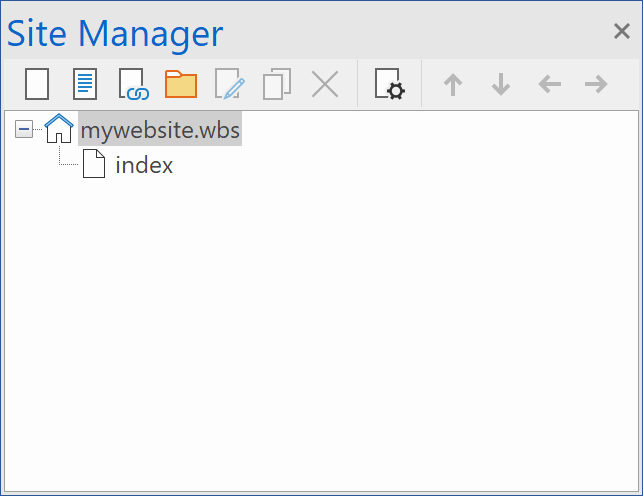
When we ask of you to share a basic copy of your project it is the wbs file not the page (HTML). If you look to the right in the program you will see the Site Manager (See Screenshot) at the top you will see what we are asking for the .wbs file your file will be named differently but it will have the same file extension .wbs. So if you can share this it will help us. Note remove any extensions or custom code you may have added. You can then share it by uploading to your own site and provide a link to it or if you use the likes of Dropbox etc you can also upload to it and again provide a link to it.
Re: A little help.
Posted: Fri Mar 20, 2026 6:30 pm
by Joker7
OK here goes.
https://freeaj.byethost5.com/zips/Botton%20Nav-Bar.zip
It seems to like it on the left I would like it to live in the centre .
Trying to get it to look like footer here
www.puy-robin.com
Re: A little help.
Posted: Fri Mar 20, 2026 8:08 pm
by alan_sh
OK got it.
You had a layout grid with fixed width cells. Not sure why. Also, the position should have been 'floating footer'. I've made those changes - also changed the cell sizes to 6,2,4 and it seems OK on my screen.
Here's what I have done
https://www.dropbox.com/scl/fi/q492rvt8 ... 43rc6&dl=1
Alan
Re: A little help.
Posted: Fri Mar 20, 2026 8:11 pm
by alan_sh
Here's what I did

Re: A little help.
Posted: Fri Mar 20, 2026 8:38 pm
by Joker7
Hi,
I have tried it this way and it's to two spread out over the page, so I fixed the the width to stop the spread.
Any other ideas on how to make it like the original?
Re: A little help.
Posted: Fri Mar 20, 2026 8:57 pm
by Pablo
You can use max-width to limit the width of a container.
Did you download my demo project I have create from your old website?
Re: A little help.
Posted: Sat Mar 21, 2026 8:39 am
by Joker7
Pablo wrote: Fri Mar 20, 2026 8:57 pm
You can use max-width to limit the width of a container.
Did you download my demo project I have create from your old website?
I have tried max-width it just squashies it and some of the text drops down to a new line.
Yes I did down load your demo - sorry to say I did not find it very very pleasing to the eye.
Re: A little help.
Posted: Sat Mar 21, 2026 9:13 am
by Pablo
Ok, sorry I was just trying to help

I have tried max-width it just squashies it and some of the text drops down to a new line.
What did you expect to happen???
Re: A little help.
Posted: Sat Mar 21, 2026 9:17 am
by Joker7
Pablo wrote: Sat Mar 21, 2026 9:13 am
Ok, sorry I was just trying to help
I have tried max-width it just squashies it and some of the text drops down to a new line.
What did you expect to happen???
To centre in the page and not be all spaced out..
Re: A little help.
Posted: Sat Mar 21, 2026 10:14 am
by Pablo
I'm sorry, it is not clear for me what you mean by
not be all spaced out..
On your original website, the footer is just a 2 column grid.
With the menu in the first column and the other elements in the second column. The max width is set to 1170
You can do the same in WWB.
Re: A little help.
Posted: Sat Mar 21, 2026 10:28 am
by Joker7
Pablo wrote: Sat Mar 21, 2026 10:14 am
I'm sorry, it is not clear for me what you mean by
not be all spaced out..
On your original website, the footer is just a 2 column grid.
With the menu in the first column and the other elements in the second column. The max width is set to 1170
You can do the same in WWB.
A wee tip on how would be helpful, just saying it can be done is not that helpful.
Re: A little help.
Posted: Sat Mar 21, 2026 10:54 am
by Pablo
Step 1
Add 2 column grid
Step 2
Add the menu to the first column
Step 3
Add the other elements to the second column
Step 4
Set the max width to 1170
I have updated the puyrobin project to demonstrate this.
Re: A little help.
Posted: Sat Mar 21, 2026 1:22 pm
by Joker7
Pablo wrote: Sat Mar 21, 2026 10:54 am
Step 1
Add 2 column grid
Step 2
Add the menu to the first column
Step 3
Add the other elements to the second column
Step 4
Set the max width to 1170
I have updated the puyrobin project to demonstrate this.
Thank you for your patience.
I have download project file, thank you for the work you have put in. I still don't know how this works in the software, I can see how in the html.
I think I need to find a video tutorial as this is something I wanted to do myself. I'm sure I will be back with more question.
Re: A little help.
Posted: Sat Mar 21, 2026 2:13 pm
by Pablo
I’m currently working on creating video tutorials, but it will take some time to cover all functionality.
I have, however, recently updated all of the written tutorials to make them clearer by adding info-graphics and improve the text and images.
Could you please let me know what is still missing from the written tutorials?
Is there anything I forgot to document?
Layout grids are based bootstrap grids (as used for your current website), they are just visual.
Re: A little help.
Posted: Sat Mar 21, 2026 7:18 pm
by Joker7
Pablo wrote: Sat Mar 21, 2026 2:13 pm
I’m currently working on creating video tutorials, but it will take some time to cover all functionality.
I have, however, recently updated all of the written tutorials to make them clearer by adding info-graphics and improve the text and images.
Could you please let me know what is still missing from the written tutorials?
Is there anything I forgot to document?
Layout grids are based bootstrap grids (as used for your current website), they are just visual.
Good evening,
I have read some of the tutorials they are fine, if you know what you looking for, some of the terminology I find confusing.
An idiots walk though on topics like, how to make a basic responsive page ect , for me would be easier to follow, learn by example.
Anyways thats my two pennies worth.
Re: A little help.
Posted: Sat Mar 21, 2026 7:35 pm
by brynj
Just a small suggestion Pablo, anything written to help should use the same names as in WYSIWYG (regardless of it it it technically correct or not) - twice today i have looked for things in the software that didn’t exist, although similar, they were not the same. I appreciate that the program is used by a lot of people commercially who have a greater understanding of terminology but for learners/new users it just confuses things.
Re: A little help.
Posted: Sun Mar 22, 2026 7:27 am
by Pablo
anything written to help should use the same names as in WYSIWYG
@brynj
Do you have an example of something that is wrong in the help?
Re: A little help.
Posted: Sun Mar 22, 2026 8:15 am
by brynj
Pablo wrote: Sun Mar 22, 2026 7:27 am
anything written to help should use the same names as in WYSIWYG
@brynj
Do you have an example of something that is wrong in the help?
See my post here for yesterdays examples ……
https://www.wysiwygwebbuilder.com/commu ... p?t=101459
As an example - the term 'Flexbox Container' appears several times in the help files but if you search for Flexbox in the Toolbox you get no results.
These are minor things and not worth special attention, but you mentioned you are re-doing the help files so just an opportunity to adjust.
Its just when told to use a ‘Bootstrap Card Container’ or a ‘Flexbox Container’ then thats naturally what you look/search for - of course you can assume the nearest thing in the program and most people would, although there maybe other possibilities with ’similar’ names - but i just think it makes sense to use the same naming as found in the software throughout any help provided.
Re: A little help.
Posted: Sun Mar 22, 2026 8:38 am
by Pablo
Thanks!
I could only find one reference 'Flexbox Container' in the help.
Everywhere else it's called flex container, like in the software. Flex is basically a shorter name for flexbox (the official HTML term).
But I will update this to prevent future confusion.
I agree that naming should be consistent.

