
Users often contact their web host’s support team when a form does not work, and they may be told that the form script is incorrect. In most cases, this is not the real issue. The built-in scripts have been developed and refined over many years, and any general problems would likely already have been resolved.
The script generated by the software depends on the settings you choose. It is not a single generic script, but one that is tailored to your form’s configuration. Since different form options produce different output, and different web hosts have different requirements, the correct setup can vary.
This means that when a form does not work, the most likely cause is not the software itself, but the form settings. To fix the issue, you must first determine why the form is failing, and then adjust the settings accordingly.
See also the “Very Important Note” later in this FAQ.
How do I create a form with the Form Wizard?
https://www.wysiwygwebbuilder.com/form_wizard.html
How do I manually create a form?
https://www.wysiwygwebbuilder.com/forms.html
Why shouldn't I use 'mailto' in the form action?
https://forum.wysiwygwebbuilder.com/viewtopic.php?t=135
PHP code is showing on the page. What is happening?
1. Is the page extension set to PHP (in Page Properties)?
2. Are you viewing the page in local preview? PHP does not work in preview. The page must be published to a webserver.
3. Does your website support PHP? Is it enabled? Contact your webhost for more details.
4. Did you insert any code at the start of the page yourself? If yes, please remove it.
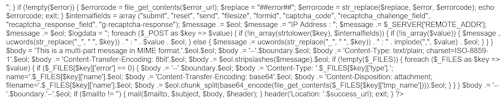
A warning message is displayed: Cannot modify header information - headers already sent by
This means that there is invalid code at the start of the page.
1. Remove all code (including spaces and empty lines!) you have manually added to the start of the page (Menu->Page->Page HTML->Start of Page).
2. Make sure there is only one form on the page.
3. Remove all extensions that use php (like blogs, news writers, cms etc) from the page.
Emails are not arriving in my inbox...
1. Did the emails end up in spam?
A useful tool to test the 'spammyness' of your emails is available here: https://www.mail-tester.com/
2. Maybe the emails were blocked by your ISP (yahoo and others may block it on the mail server)
3. Does your host support PHP mail?
4. Most webhosts now require you to use SMTP authentication for forms. You can configure this in the advanced properties of the form (mail engine -> use php mailer)

5. Does your host allow you to send email to the destination email address? Some web hosts have restrictions on the email addresses that can be used to send messages from your website. If your form appears to submit correctly but no email is received, check the From email settings of the form processor.
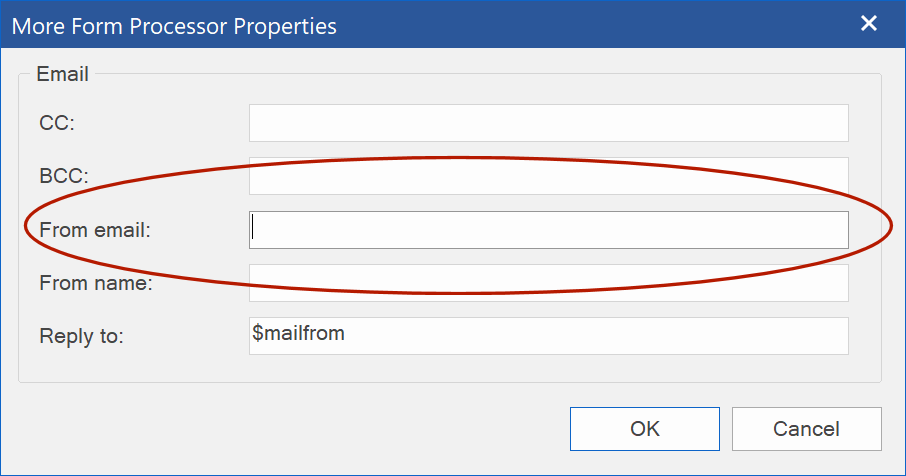
Recommended settings
In Form Properties → More Form Processor Properties, use settings similar to these:
From email:
forms@yourwebsite.com
Use a fixed email address that belongs to your website/domain.
From name:
$_POST['name']
This is optional. It uses the value of the form field named 'name' as the sender's display name. You can also enter a fixed name, such as:
Website contact form
Reply to:
$_POST['email']
This makes replies go to the email address entered by the visitor, while the message itself is still sent from your website's email address.
Why use a fixed From email?
If From email is left empty, the form processor will use the form field named 'email' as the From address when that field exists.
For example, if a visitor enters:
visitor@gmail.com
the generated message may be sent by your web server with 'visitor@gmail.com' as its From address. Some hosting providers and mail servers do not allow this.
Using a fixed address from your own domain avoids this problem:
From: forms@yourwebsite.com
Reply to: $_POST['email']
You can then click Reply in your email program and the reply will still be addressed to the visitor.
Using a fixed Reply to address
The Reply to field can also contain a fixed email address. In this field, a fixed address must be enclosed in quotes:
'yourname@email.com'
To use an email address entered in the form, use the corresponding PHP variable without quotes:
$_POST['email']
The name between the brackets must match the Name property of your email input field.
6. If changing the email in the form properties address does not work then rename the 'email' editbox to 'e-mail'. This will prevent the script from using the specified email address as the 'from' address.
7. Is your host GoDaddy?
UPDATE: Most new GoDaddy accounts now do support standard PHP mail and/or PHP mailer, so that means you can use the built-in form script.
Please read this related FAQ: https://forum.wysiwygwebbuilder.com/vie ... 10&t=57559
8. Did you insert any code at the start of the page yourself? If yes, please remove it.
9. If the form does not give an error message then there is most likely a problem on the server side. Please contact your host for further assistance.
*** VERY IMPORTANT NOTE ***
If you need our assistance with the configuration of your form, then you will first have to contact your web host and ask them why the emails are not sent.
For example, they may have specific requirements or restrictions (no support for mail, smtp limitations, 'from email must be within domain' etc).
Only with the feedback of your web host you can solve configuration issues, because different web hosts need different settings!
We cannot help you, if you do not know what the exact error is.
See also "How do I display the error message on the error page?' later in this FAQ.
The email is sent but I do not see the success page.
1. Did you insert any other PHP code to the page? Please remove all other code from the page.
2. Is there more than one form on the page? You can have only one form per page.
Can I leave the success and error field empty?
No, otherwise an empty page will be displayed when the form has been submitted.
Should the success and error pages be PHP?
No
The success and error pages are loaded dynamically by the form script, so all code of the page will be displayed "AS IS" without going through the PHP parser on the server.
Therefor the success and error pages should not contain PHP.
What if my host does not support php mail or php mailer?
If your server is not PHP-enabled, then you should contact your web host and ask them for the details on processing forms. Some servers offer server-side scripts that you can use, and if this is the case you'll need instructions setting this facility up.
Alternately you can use a remotely hosted solutions like http://www.formbuddy.com or http://www.mailmyform.com.
These services let you access a CGI script run off of their servers. You build your form as you normally would, but now you fill in the URL of the remote CGI script.
The CGI script translates your form into an email message and sends it on to the address you provide.
How can I make sure the 'from address' in the email message is the entered email in the form.
If the form's email input field is named 'email' then this will be used as the 'from' address for the message. Otherwise the email address configured in the form will be used as the sender of the message.
So make sure the email input field of in your form has the name 'email' (not 'e-mail' or 'Email', but 'email' !).
Note:
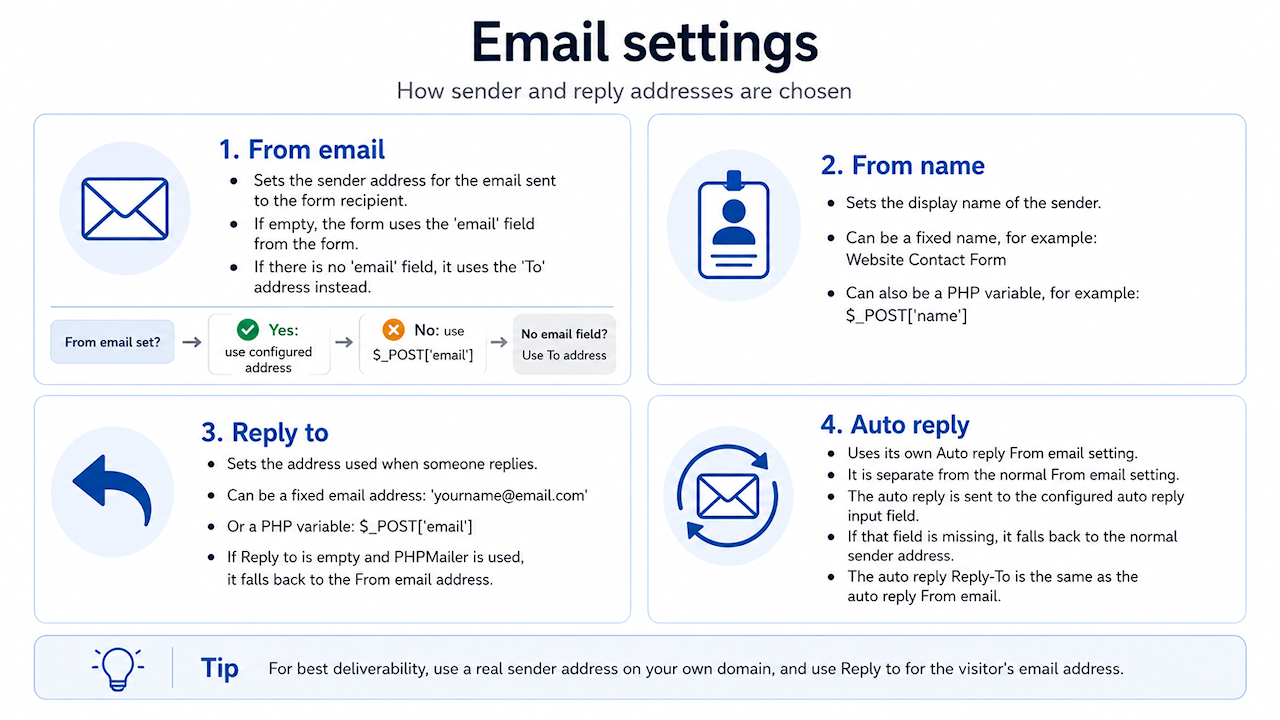
**From email** sets the sender email address used for the message that is sent to the form recipient.
If **From email** is left empty, the form processor will try to use the value of the form input named `email`. If the form does not contain an input named `email`, the recipient address (`To`) will be used instead.
For best delivery reliability, it is usually recommended to use an email address that belongs to the same domain as the website or SMTP account. Use **Reply to** when you want replies to go to the visitor’s email address.
**From name** sets the display name of the sender.
You can enter a fixed name, for example:
`Website Contact Form`
You can also use a PHP variable, for example:
$_POST['name']
where `name` is the name of the input field in the form.
**Reply to** sets the address that will be used when the recipient replies to the email.
This can be a fixed email address, in which case it must be entered as a quoted PHP string:
'yourname@email.com'
or a PHP variable, for example:
$_POST['email']
If you are using PHPMailer and **Reply to** is left empty, the form processor will use the selected **From email** address as the reply-to address.
The auto responder option does not send the message to email entered in the form.
The Input field name in the Auto Responder settings must match the Name property of the email input field in your form.
By default, the Auto Responder uses: email
This means your form must contain an input field whose Name is exactly: email
For example, these are different field names and will not match:
email_address
If your email input field uses a different name, enter that name in:
Form Properties → Advanced Form Processor Properties → Auto Responder → Input field name
For example, if the email field in your form has the name: customer_email
then set Input field name to: customer_email
Also check the From email address
The From email address is the address used to send the automatic reply. It is not the address of the visitor.
Some web hosts only allow your website to send email using an address from the same domain as the website. Therefore, it is recommended to use an address such as:
forms@yourwebsite.com
rather than:
yourname@gmail.com
The Auto Responder will then send the message from forms@yourwebsite.com to the address entered by the visitor in the form field named email.
The server displays a warning about file_get_contents()
Make sure you have set the success and error page in the form properties!
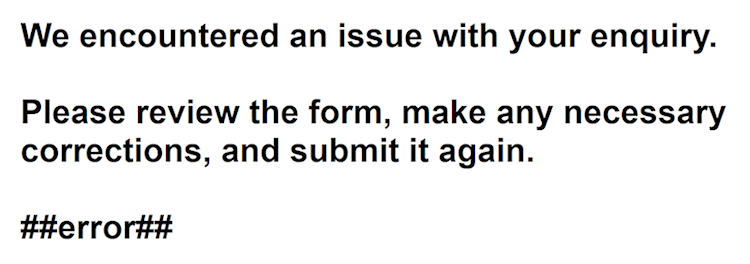
How do I display the error message on the error page?
Insert a text object to the page.
Enter this text somewhere in the text ##error##
The form processor will replace it will the actual error message.
Not all form fields are in email message:(
1. Are all field part of the form?
2. Do they have valid names? Spaces, commas, dots, dashes and other special characters are not allowed in the names of form fields.
3. Did you use the same name twice?
How do I change the order of the fields in email?
The z-order determines the order of the fields n the email.
You can change the z-order through the Object Manager or by using the Arrange tools (Move to front/Move to back).
Alternatively you can select 'Arrange objects' in the context menu (right click) of the form.
How do I add extra fields once a form has already been created with the Form Wizard?
Just enlarge your form to make space for the new fields, then simply add them from the Toolbox.
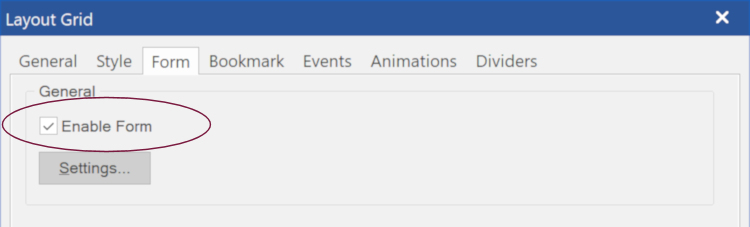
Can a form be added to the Layout Grid?
No, but the Layout Grid itself can be a form! In the properties check 'Enable form' to turn the Layout Grid into form. A Layout Grid has the same settings as a standard form.
How can users upload a file to a folder on the server using the built-in PHP form processor?
1. Make sure you enable the built-in PHP form processor
2. Add a 'File Upload' object to the page.
3. By default the uploaded file(s) will be included as an attachment of the email message, but you can choose to upload the file(s) to a folder on the server.
Simply enable the option 'Upload files to a folder on the server' and specify the folder name. On some server you may need to give this folder write permissions.
4. Most hosting services limit upload size to between 2 and 4 Mb. While you can control the upload limit by adding an hidden field called 'filesize' with the size in kB, it will nevertheless comply with the limits imposed by the hosting providers.
Note: If you choose not to use the built-in form processor, then you must implement a script to handle file uploads yourself!
How to format the email message sent by a form?
Related FAQ:
https://forum.wysiwygwebbuilder.com/vie ... 10&t=64476
How to use the built-in form validation tools?
Related tutorial:
https://www.wysiwygwebbuilder.com/validation.html
Validation does not work!
1. Is JavaScript enabled in the browser?
2. Is there other JavaScript code on the page which causes a conflict?
Please remove all custom code.
3. Did you specify conflicting constraints?
CAPTCHA is not working!
1. Did you publish all files, including the captcha.php file?
2. Does your host support PHP's GD library?
3. The CAPTCHA object must be part of a form. And because it uses PHP, it can only be used/tested on a web server with PHP support!.
4. In some cases an error message may be displayed on your website. The message is will look something like this:
Warning: imagepng(): Unable to open './captcha.png' for writing in /../../captcha.php on line x
This problem may occur when the captcha script is placed in a folder on the website. The solution is to change the properties of that folder after publishing. The correct properties are 757 or 777. You can use the built-in FTP client to change the permissions of the folder.
Some web servers that do not allow to set the GDFONTPATH option (used by the CAPTCHA script) through scripting. You can disable this option in Menu->Tools->Options->HTML
5. Another common problem is that PHP sessions are not enabled for the web account. Contact the web host to make sure PHP sessions are enabled and working.
Form element no longer works when using events
Please read: https://forum.wysiwygwebbuilder.com/vie ... 10&t=37833
How do I build my own form processor?
https://www.wysiwygwebbuilder.com/forms_php.html
See also the help or manual!
Is there an alternative for the built-in form PHP processor?
Yes, NavalDesign has created a very powerful alternative form processor!
https://forum.wysiwygwebbuilder.com/vie ... php?t=8650
Can I use third party processors?
Yes, you can use any third party form processing service you want.
You can still use with the built-in tools to create the layout of the form and then set the 'action' property of the form to URL of the third party form processing script.
For some services you may also need to add some extra hidden fields. Please consult the documentation of the form processing provider for more information.
Where do I find more details about forms?
A lot of information is available in the help and manual.
I have a problem which is not covered in the help, tutorials or FAQ, can you help?
There is also a dedicated support forum section related to forms:
https://forum.wysiwygwebbuilder.com/viewforum.php?f=21
Make sure you include the following information, otherwise there is nothing we can do to help you:
- a link to the page with form.
- the settings of your form.
- the exact steps to reproduce the problem on your website.
Please browse through the existing messages to see if your problem has not been discussed before.