Layout Grid settings - not all of them copy to Break Points
Posted: Wed Feb 25, 2026 11:02 am
Hi all,
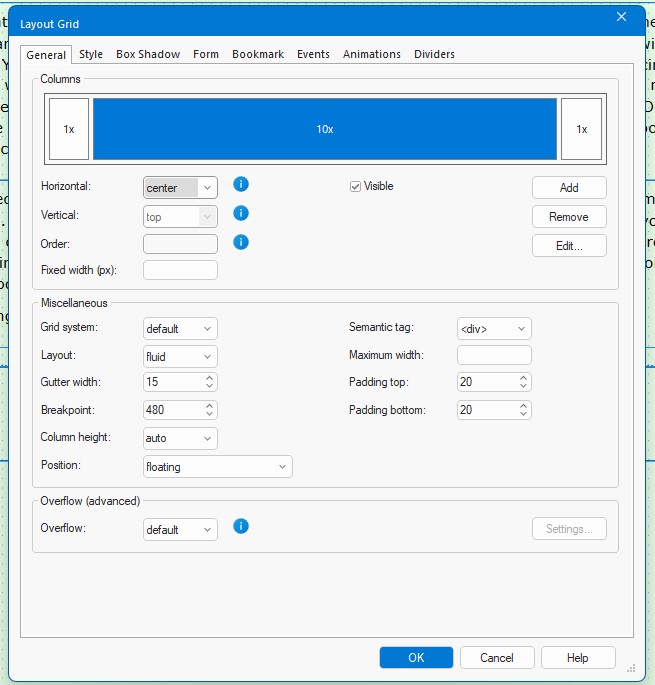
I use Layout Grid to produce a web site. In the section titled Blog each grid is for one month i.e. January, February, March etc. The site is built with three Break points plus the default page. So they are - Default (where all new text and any images are placed) - 1024- 768 - 320. The Layout grid is produced in the Default page and copies itself to the three other pages. In the Default page I set the grid to have three areas 1x - 10x - 1x making the 12 in all, everything is placed in the middle grid the two outer grids are never used. I then set the padding to 20 top and 20 bottom for the grids again in the default page. Also in Default the middle 10x grid is set to... Center, Grid system to Default, Position to Floating, Break Point to 480. A screen shot of the settings is below.
While all works well on the Default page, the Center position command doesn't copy to the other three pages, each has it always set to the Left. Meaning I need to remember this and set each pages grid to Middle in turn. All the other settings seem to copy correctly!
What am I doing wrong or is this a setting issue? What I would like is everything produced on the default page to be copied to the three main pages.
https://www.favershammrc.org.uk/Blog_2026.html
Thanks in advance
Brian
I use Layout Grid to produce a web site. In the section titled Blog each grid is for one month i.e. January, February, March etc. The site is built with three Break points plus the default page. So they are - Default (where all new text and any images are placed) - 1024- 768 - 320. The Layout grid is produced in the Default page and copies itself to the three other pages. In the Default page I set the grid to have three areas 1x - 10x - 1x making the 12 in all, everything is placed in the middle grid the two outer grids are never used. I then set the padding to 20 top and 20 bottom for the grids again in the default page. Also in Default the middle 10x grid is set to... Center, Grid system to Default, Position to Floating, Break Point to 480. A screen shot of the settings is below.
While all works well on the Default page, the Center position command doesn't copy to the other three pages, each has it always set to the Left. Meaning I need to remember this and set each pages grid to Middle in turn. All the other settings seem to copy correctly!
What am I doing wrong or is this a setting issue? What I would like is everything produced on the default page to be copied to the three main pages.
https://www.favershammrc.org.uk/Blog_2026.html
Thanks in advance
Brian