https://sonnenastro.de/2026/Sonnenastro2026.zip
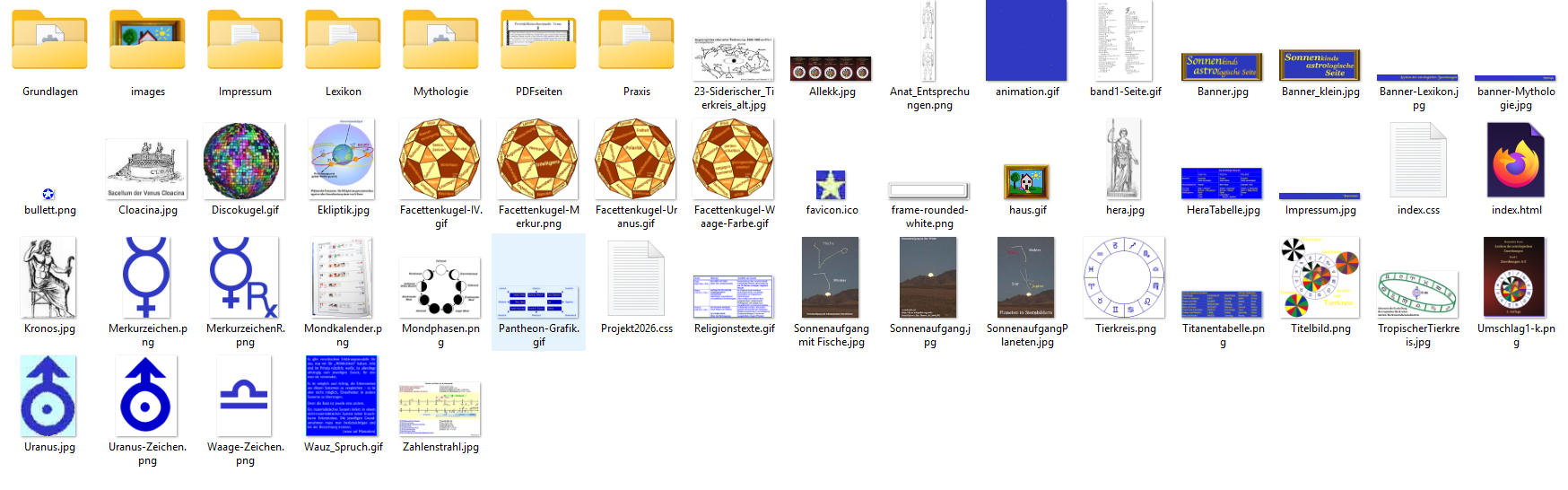
Though I have a clear folder structure and defined all picture links to the image-folders in the specific item, when "published" the program copys all pictures to the root i.e. the place where the index file is.
So I have a big index folder and image folders too
All pictures doubled into the root
Forum rules
PLEASE READ THE FORUM RULES BEFORE YOU POST:
viewtopic.php?f=12&t=1901
MUST READ:
http://www.wysiwygwebbuilder.com/publish.html
http://www.wysiwygwebbuilder.com/preview.html
Frequently Asked Questions about Publishing
PLEASE READ THE FORUM RULES BEFORE YOU POST:
viewtopic.php?f=12&t=1901
MUST READ:
http://www.wysiwygwebbuilder.com/publish.html
http://www.wysiwygwebbuilder.com/preview.html
Frequently Asked Questions about Publishing
-
Kantonia

-

- Posts: 45
- Joined: Fri Aug 15, 2025 8:50 am
- Location: Germany
- Contact:
All pictures doubled into the root
A hobby is a grind that you would never do for money
-
alan_sh
-

- Posts: 1927
- Joined: Tue Jan 01, 2019 5:50 pm
Re: All pictures doubled into the root
Check your settings. Where have you asked WWB to publish the images?
-
Pablo

- Posts: 24097
- Joined: Sun Mar 28, 2004 12:00 pm
- Location: Europe
- Contact:
Re: All pictures doubled into the root
I have published your website and there are no images in the root. Only html and CSS. The images are in the 'images' folder as specified in your settings.
What do I need to do to see the issue?
What do I need to do to see the issue?
-
Kantonia
-
- Posts: 45
- Joined: Fri Aug 15, 2025 8:50 am
- Location: Germany
- Contact:
Re: All pictures doubled into the root
Look at the added Screenshot of the root.
A hobby is a grind that you would never do for money
-
alan_sh
-
- Posts: 1927
- Joined: Tue Jan 01, 2019 5:50 pm
Re: All pictures doubled into the root
I just published your project. All the files were in the correct place. No duplicates. This is what it looks like.

Havew you tried deleting all files at the target location and republishing everything? Try that.
If that doesn't work, check the options. Open WWB, go to Tools -> Options. The click on Publish and check the file type putput folder. On my system, all the pictures are in 'images'. What does yours say? This is mine:

Havew you tried deleting all files at the target location and republishing everything? Try that.
If that doesn't work, check the options. Open WWB, go to Tools -> Options. The click on Publish and check the file type putput folder. On my system, all the pictures are in 'images'. What does yours say? This is mine:
-
Pablo
- Posts: 24097
- Joined: Sun Mar 28, 2004 12:00 pm
- Location: Europe
- Contact:
Re: All pictures doubled into the root
Are you sure these files are generated by the software?
Maybe they are already in this folder, before publish?
The project you have shared seem to be working correct. There are no file in the root.
If you need further assistance, then please describe the exact steps to reproduce this behavior with the project you have shared.
Maybe they are already in this folder, before publish?
The project you have shared seem to be working correct. There are no file in the root.
If you need further assistance, then please describe the exact steps to reproduce this behavior with the project you have shared.
-
Kantonia
-
- Posts: 45
- Joined: Fri Aug 15, 2025 8:50 am
- Location: Germany
- Contact:
Re: All pictures doubled into the root
I spent the whole morning controlling all picture files, setting the right links and deleting all in the root. Then I ran "publishing" again and that was the result.
The Option settings are exactly the same as in your screenshot.
I'm going now to delete all picture files in the root and publish again. I'll report what happens.
The Option settings are exactly the same as in your screenshot.
I'm going now to delete all picture files in the root and publish again. I'll report what happens.
A hobby is a grind that you would never do for money