Following on from yesterday, I am finding bookmarks really frustrating to work with.
I found this thread: viewtopic.php?t=90263
In the last post, Pablo mentioned using smooth scroll and offsets, so I decided to investigate. So far, only one combination of settings had any effect: most settings I tried just didn't do anything. The offset seems to make no difference whatsoever, nor does the speed setting. I just don't know what I am doing wrong. I am sure it must be me ...
Has anyone else had any luck with this? I can provide a demo file later, if necessary.
I am finding it frustrating that I can't add an anchor point to any object and not just layout grids. Adding bookmarks to the page does not work well - it's very hit and miss.
What I just don't understand is where the objects end up on the page: nothing ends up at the top of the viewport, even though there's a lot of page below it.
I assumed that setting a layout grid as a bookmark would always leave me with the top of the layout grid at the top of the page, but it just doesn't work that way, and the results are so inconsistent that I am not sure that I can work with it. I know that Pablo's demo pages work as expected.
I'll sort out that demo file soon. I need a fresh pair of eyes to see what I am missing here.
[SOLVED] Using Layout Grids as Bookmarks
Forum rules
IMPORTANT NOTE!!
DO YOU HAVE A QUESTION OR PROBLEM AND WANT QUICK HELP?
THEN PLEASE SHARE A "DEMO" PROJECT.
PLEASE READ THE FORUM RULES BEFORE YOU POST:
http://www.wysiwygwebbuilder.com/forum/viewtopic.php?f=12&t=1901
MUST READ:
http://www.wysiwygwebbuilder.com/getting_started.html
WYSIWYG Web Builder FAQ
IMPORTANT NOTE!!
DO YOU HAVE A QUESTION OR PROBLEM AND WANT QUICK HELP?
THEN PLEASE SHARE A "DEMO" PROJECT.
PLEASE READ THE FORUM RULES BEFORE YOU POST:
http://www.wysiwygwebbuilder.com/forum/viewtopic.php?f=12&t=1901
MUST READ:
http://www.wysiwygwebbuilder.com/getting_started.html
WYSIWYG Web Builder FAQ
-
AliGW

-

- Posts: 819
- Joined: Thu Dec 19, 2024 3:41 pm
[SOLVED] Using Layout Grids as Bookmarks
Last edited by AliGW on Tue Mar 31, 2026 5:41 am, edited 1 time in total.
Ali
Retired, but still loving to learn & very busy.
https://alisongwright.me.uk
Novice with WWB, but was an avid user of Serif WebPlus before.
Fairly expert at Microsoft Excel (but not VBA) & Affinity by Canva (for page layout).
Retired, but still loving to learn & very busy.
https://alisongwright.me.uk
Novice with WWB, but was an avid user of Serif WebPlus before.
Fairly expert at Microsoft Excel (but not VBA) & Affinity by Canva (for page layout).
-
AliGW
-
- Posts: 819
- Joined: Thu Dec 19, 2024 3:41 pm
Re: Using Layout Grids as Bookmarks
I have created a test file and got it working up to a point. The image needed for the master page is in the folder inside the ZIP.
https://we.tl/t-MvSGx4xDhdYYpoB2
So, all menu items are linked to their respective layout grids. Each layout grid has the bookmark settings as follows:
Smooth Scroll: on
Speed: 600
Type: linear
Offset: -135
If I test menu items in turn and return to Home after each, they do what I am expecting. However, if I go to Ethos and then back to Gallery, Gallery is no longer at the top. Similarly, if I go to About and then back to either Ethos or Gallery, they are out. Likewise if I go from Gallery to Ethos. Why are they not being returned to the correct place relative to the top of the viewport? What am I doing wrong here or not understanding?
Thank you!
https://we.tl/t-MvSGx4xDhdYYpoB2
So, all menu items are linked to their respective layout grids. Each layout grid has the bookmark settings as follows:
Smooth Scroll: on
Speed: 600
Type: linear
Offset: -135
If I test menu items in turn and return to Home after each, they do what I am expecting. However, if I go to Ethos and then back to Gallery, Gallery is no longer at the top. Similarly, if I go to About and then back to either Ethos or Gallery, they are out. Likewise if I go from Gallery to Ethos. Why are they not being returned to the correct place relative to the top of the viewport? What am I doing wrong here or not understanding?
Thank you!
Ali
Retired, but still loving to learn & very busy.
https://alisongwright.me.uk
Novice with WWB, but was an avid user of Serif WebPlus before.
Fairly expert at Microsoft Excel (but not VBA) & Affinity by Canva (for page layout).
Retired, but still loving to learn & very busy.
https://alisongwright.me.uk
Novice with WWB, but was an avid user of Serif WebPlus before.
Fairly expert at Microsoft Excel (but not VBA) & Affinity by Canva (for page layout).
-
Pablo

- Posts: 24953
- Joined: Sun Mar 28, 2004 12:00 pm
- Location: Europe
- Contact:
Re: Using Layout Grids as Bookmarks
First you will have to understand that bookmarks are standard HTML functionality, it not something that I have invented.
The functionality is implement in the browser, not in WWB.
Basically, a bookmark is just an anchor tag with a name. it's the most basic HTML element of a page, without any special functionality or styling attached.
So, if it does not work then something may be wrong with the logic of how it is used.
Also, any object can be used as anchor, not just layout grids. Tools -> Options -> User Interface -> Display all objects in Bookmarks dropdown list
But in my opinion it is more logical to use entire section as anchor instead individual objects.
I have created many templates that use bookmarks. There are only a few that do not use them.
The functionality is implement in the browser, not in WWB.
Basically, a bookmark is just an anchor tag with a name. it's the most basic HTML element of a page, without any special functionality or styling attached.
So, if it does not work then something may be wrong with the logic of how it is used.
Also, any object can be used as anchor, not just layout grids. Tools -> Options -> User Interface -> Display all objects in Bookmarks dropdown list
But in my opinion it is more logical to use entire section as anchor instead individual objects.
I have created many templates that use bookmarks. There are only a few that do not use them.
-
AliGW
-
- Posts: 819
- Joined: Thu Dec 19, 2024 3:41 pm
Re: Using Layout Grids as Bookmarks
I did not say that you had invented anything. I am not pointing the finger at anyone but myself. You don't need to be defensive - you are not being criticised here. I know it must be me, but I just can't work it out.First you will have to understand that bookmarks are standard HTML functionality, it not something that I have invented.
The functionality is implement in the browser, not in WWB.
Most probably, but what? I have attached a demo file.So, if it does not work then something may be wrong with the logic of how it is used.
I had not realised that setting was there - thanks for that. I, too, would prefer to use layout grids as anchors, but they aren't quite doing what I expect them to do based on my own logic, which is most probably at fault.Also, any object can be used as anchor, not just layout grids. Tools -> Options -> User Interface -> Display all objects in Bookmarks dropdown list
But in my opinion it is more logical to use entire section as anchor instead individual objects.
I know - I also made it very clear that it must be me who is making an error. Again, you don't need to defend yourself. It's not going to be you: it's going to be me, but I can't work it out without asking.I have created many templates that use bookmarks. There are only a few that do not use them.
Ali
Retired, but still loving to learn & very busy.
https://alisongwright.me.uk
Novice with WWB, but was an avid user of Serif WebPlus before.
Fairly expert at Microsoft Excel (but not VBA) & Affinity by Canva (for page layout).
Retired, but still loving to learn & very busy.
https://alisongwright.me.uk
Novice with WWB, but was an avid user of Serif WebPlus before.
Fairly expert at Microsoft Excel (but not VBA) & Affinity by Canva (for page layout).
-
Pablo
- Posts: 24953
- Joined: Sun Mar 28, 2004 12:00 pm
- Location: Europe
- Contact:
Re: Using Layout Grids as Bookmarks
Thanks for posting the demo.
The bookmark in your project works, the confusing part is probably caused by the fixed header. The anchor starts at the top of the page so you will need to take into account that the menu overlaps part of section.
You will need to add the height of menu as offset (90px)
When I change all offsets in your projetc to 90 (instead of 135) then it seems to work
Note that offsets only work when smooth scrolling is enabled.
The bookmark in your project works, the confusing part is probably caused by the fixed header. The anchor starts at the top of the page so you will need to take into account that the menu overlaps part of section.
You will need to add the height of menu as offset (90px)
When I change all offsets in your projetc to 90 (instead of 135) then it seems to work
Note that offsets only work when smooth scrolling is enabled.
-
AliGW
-
- Posts: 819
- Joined: Thu Dec 19, 2024 3:41 pm
Re: Using Layout Grids as Bookmarks
That's great! It certainly seems to work when going backwards, but if I go from Home to Gallery, the top of the layout grid is cut off- any idea why this might be?
Also, is it possible to get the smooth scrolling effect with the Home anchor point - where would I be able to set that, if at all?
I really do appreciate your help.
EDIT: Found smooth scrolling for the Home anchor!
Also, is it possible to get the smooth scrolling effect with the Home anchor point - where would I be able to set that, if at all?
I really do appreciate your help.
EDIT: Found smooth scrolling for the Home anchor!
Ali
Retired, but still loving to learn & very busy.
https://alisongwright.me.uk
Novice with WWB, but was an avid user of Serif WebPlus before.
Fairly expert at Microsoft Excel (but not VBA) & Affinity by Canva (for page layout).
Retired, but still loving to learn & very busy.
https://alisongwright.me.uk
Novice with WWB, but was an avid user of Serif WebPlus before.
Fairly expert at Microsoft Excel (but not VBA) & Affinity by Canva (for page layout).
-
AliGW
-
- Posts: 819
- Joined: Thu Dec 19, 2024 3:41 pm
Re: Using Layout Grids as Bookmarks
In the real file, where the layout grids are deeper, all layout grids have the top cut off when I scroll forwards (from Home only), but not when I scroll back. I am sure this has something to do with the banner settings I have. I imagine what I really need is a different offset when scrolling down, but this would not appear to be possible.
Thanks again for the advice.
Thanks again for the advice.
Ali
Retired, but still loving to learn & very busy.
https://alisongwright.me.uk
Novice with WWB, but was an avid user of Serif WebPlus before.
Fairly expert at Microsoft Excel (but not VBA) & Affinity by Canva (for page layout).
Retired, but still loving to learn & very busy.
https://alisongwright.me.uk
Novice with WWB, but was an avid user of Serif WebPlus before.
Fairly expert at Microsoft Excel (but not VBA) & Affinity by Canva (for page layout).
-
crispy68

-

- Posts: 3226
- Joined: Thu Oct 23, 2014 12:43 am
- Location: Acworth, GA
- Contact:
Re: Using Layout Grids as Bookmarks
I think part of the issue is that the margin is not figured into the overall height of your header. By using padding, it will be part of the height and the javascript will now be able to calculate things better. However, due to the menu being part of the header and then changing to sticky (which removes it from the header at that point) this changes the height of the header and using the header as a bookmark doesn't work well. Using a standalone bookmark for the top is the best solution in this case.
Try this:
Master page:
1. Click on your headerLayoutGrid and remove the 50px margin and add 50px top padding in the grid.
2. Click on Dividers and add a top Rectangle divider with height of 50px and color it red to match background.
3. Move your HomeBookmark from the index page to the Master page. Place it in the top left of the page underneath your HeaderLayoutgrid. You may need to hide your header to place it there. Make sure to enable smooth scroll to the book mark.
4. In your menu, set the home button to this bookmark on the master page.
On Index page:
1. Change all of the offsets to match the height of your sticky menu which is 86px.
Try this:
Master page:
1. Click on your headerLayoutGrid and remove the 50px margin and add 50px top padding in the grid.
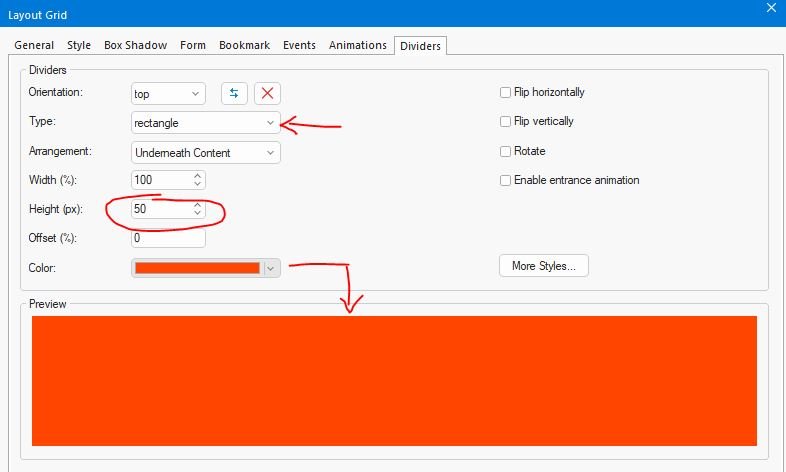
2. Click on Dividers and add a top Rectangle divider with height of 50px and color it red to match background.
3. Move your HomeBookmark from the index page to the Master page. Place it in the top left of the page underneath your HeaderLayoutgrid. You may need to hide your header to place it there. Make sure to enable smooth scroll to the book mark.
4. In your menu, set the home button to this bookmark on the master page.
On Index page:
1. Change all of the offsets to match the height of your sticky menu which is 86px.
-
AliGW
-
- Posts: 819
- Joined: Thu Dec 19, 2024 3:41 pm
Re: Using Layout Grids as Bookmarks
Thanks, Crispy!
I have just completed the first draft of the site, so I've had enough for today, but I shall try your suggestion tomorrow.
I have just completed the first draft of the site, so I've had enough for today, but I shall try your suggestion tomorrow.
Ali
Retired, but still loving to learn & very busy.
https://alisongwright.me.uk
Novice with WWB, but was an avid user of Serif WebPlus before.
Fairly expert at Microsoft Excel (but not VBA) & Affinity by Canva (for page layout).
Retired, but still loving to learn & very busy.
https://alisongwright.me.uk
Novice with WWB, but was an avid user of Serif WebPlus before.
Fairly expert at Microsoft Excel (but not VBA) & Affinity by Canva (for page layout).
-
AliGW
-
- Posts: 819
- Joined: Thu Dec 19, 2024 3:41 pm
Re: Using Layout Grids as Bookmarks
I am stuck at this point. I could not see a rectangle divider option, but I set one up with the settings you mentioned and I see nothing, neither on the page nor in preview.2. Click on Dividers and add a top Rectangle divider with height of 50px and color it red to match background.
In every other way, it works. So, I just need to get my red strip back on top.
Ali
Retired, but still loving to learn & very busy.
https://alisongwright.me.uk
Novice with WWB, but was an avid user of Serif WebPlus before.
Fairly expert at Microsoft Excel (but not VBA) & Affinity by Canva (for page layout).
Retired, but still loving to learn & very busy.
https://alisongwright.me.uk
Novice with WWB, but was an avid user of Serif WebPlus before.
Fairly expert at Microsoft Excel (but not VBA) & Affinity by Canva (for page layout).
-
crispy68
-
- Posts: 3226
- Joined: Thu Oct 23, 2014 12:43 am
- Location: Acworth, GA
- Contact:
Re: Using Layout Grids as Bookmarks
It's possible that the Rectangle shape divider is included in the extra dividers pack here: https://www.wysiwygwebbuilder.com/free_extras.html
-
Pablo
- Posts: 24953
- Joined: Sun Mar 28, 2004 12:00 pm
- Location: Europe
- Contact:
Re: Using Layout Grids as Bookmarks
You should have the rectangle divider by default.
-
AliGW
-
- Posts: 819
- Joined: Thu Dec 19, 2024 3:41 pm
Re: Using Layout Grids as Bookmarks
I might be looking in the wrong place, but the dividers tab in the layout grid properties only has None in the type drop-down. Am I in the right place? If so, am I missing something?
What are the exact settings that I need on that tab?
The divider looks like it's there, but it is white - it's not the dark red that I have set it to.
What are the exact settings that I need on that tab?
The divider looks like it's there, but it is white - it's not the dark red that I have set it to.
Ali
Retired, but still loving to learn & very busy.
https://alisongwright.me.uk
Novice with WWB, but was an avid user of Serif WebPlus before.
Fairly expert at Microsoft Excel (but not VBA) & Affinity by Canva (for page layout).
Retired, but still loving to learn & very busy.
https://alisongwright.me.uk
Novice with WWB, but was an avid user of Serif WebPlus before.
Fairly expert at Microsoft Excel (but not VBA) & Affinity by Canva (for page layout).
-
crispy68
-
- Posts: 3226
- Joined: Thu Oct 23, 2014 12:43 am
- Location: Acworth, GA
- Contact:
Re: Using Layout Grids as Bookmarks
There should be a bunch of dividers under the type dropdown of which Rectangle should be one of them.
-
Pablo
- Posts: 24953
- Joined: Sun Mar 28, 2004 12:00 pm
- Location: Europe
- Contact:
Re: Using Layout Grids as Bookmarks
Maybe you have changed the system folder?
https://www.wysiwygwebbuilder.com/commu ... hp?t=76719
https://www.wysiwygwebbuilder.com/commu ... hp?t=76719
-
AliGW
-
- Posts: 819
- Joined: Thu Dec 19, 2024 3:41 pm
Re: Using Layout Grids as Bookmarks
Checking.
Yes, it's the same problem I've had before when upgrading - my system file location had been reset. I've changed it back and all is now OK. I must remember to check this each time I run an update, as it has caught me out before.
Thanks for the help - all is now good.
Yes, it's the same problem I've had before when upgrading - my system file location had been reset. I've changed it back and all is now OK. I must remember to check this each time I run an update, as it has caught me out before.
Thanks for the help - all is now good.
Ali
Retired, but still loving to learn & very busy.
https://alisongwright.me.uk
Novice with WWB, but was an avid user of Serif WebPlus before.
Fairly expert at Microsoft Excel (but not VBA) & Affinity by Canva (for page layout).
Retired, but still loving to learn & very busy.
https://alisongwright.me.uk
Novice with WWB, but was an avid user of Serif WebPlus before.
Fairly expert at Microsoft Excel (but not VBA) & Affinity by Canva (for page layout).
-
Pablo
- Posts: 24953
- Joined: Sun Mar 28, 2004 12:00 pm
- Location: Europe
- Contact:
Re: [SOLVED] Using Layout Grids as Bookmarks
An update should not affect your settings. Only upgrades use a different configuration.
-
AliGW
-
- Posts: 819
- Joined: Thu Dec 19, 2024 3:41 pm
Re: [SOLVED] Using Layout Grids as Bookmarks
Pablo - we've had this conversation before. I am not going to argue with you, but I can assure you it is happening, and has now caught me out twice. At least I know how to fix it.
Ali
Retired, but still loving to learn & very busy.
https://alisongwright.me.uk
Novice with WWB, but was an avid user of Serif WebPlus before.
Fairly expert at Microsoft Excel (but not VBA) & Affinity by Canva (for page layout).
Retired, but still loving to learn & very busy.
https://alisongwright.me.uk
Novice with WWB, but was an avid user of Serif WebPlus before.
Fairly expert at Microsoft Excel (but not VBA) & Affinity by Canva (for page layout).
-
Pablo
- Posts: 24953
- Joined: Sun Mar 28, 2004 12:00 pm
- Location: Europe
- Contact:
Re: [SOLVED] Using Layout Grids as Bookmarks
Are you removing the software before installing updates?
An update can be installed on top of the current installed version. In that case, no settings will be changed.
An update can be installed on top of the current installed version. In that case, no settings will be changed.
-
AliGW
-
- Posts: 819
- Joined: Thu Dec 19, 2024 3:41 pm
Re: [SOLVED] Using Layout Grids as Bookmarks
No.Are you removing the software before installing updates?
Ali
Retired, but still loving to learn & very busy.
https://alisongwright.me.uk
Novice with WWB, but was an avid user of Serif WebPlus before.
Fairly expert at Microsoft Excel (but not VBA) & Affinity by Canva (for page layout).
Retired, but still loving to learn & very busy.
https://alisongwright.me.uk
Novice with WWB, but was an avid user of Serif WebPlus before.
Fairly expert at Microsoft Excel (but not VBA) & Affinity by Canva (for page layout).
-
Pablo
- Posts: 24953
- Joined: Sun Mar 28, 2004 12:00 pm
- Location: Europe
- Contact:
Re: [SOLVED] Using Layout Grids as Bookmarks
Ok, that is strange. Because the setup does not change any settings.
-
AliGW
-
- Posts: 819
- Joined: Thu Dec 19, 2024 3:41 pm
Re: [SOLVED] Using Layout Grids as Bookmarks
I'll keep an eye on it. Today's update hasn't affected it, fortunately.
Ali
Retired, but still loving to learn & very busy.
https://alisongwright.me.uk
Novice with WWB, but was an avid user of Serif WebPlus before.
Fairly expert at Microsoft Excel (but not VBA) & Affinity by Canva (for page layout).
Retired, but still loving to learn & very busy.
https://alisongwright.me.uk
Novice with WWB, but was an avid user of Serif WebPlus before.
Fairly expert at Microsoft Excel (but not VBA) & Affinity by Canva (for page layout).