WWB IDE workspace Dark Mode

All WYSIWYG Web Builder support issues that are not covered in the forums below.
Forum rules
IMPORTANT NOTE!!

DO YOU HAVE A QUESTION OR PROBLEM AND WANT QUICK HELP?
THEN PLEASE SHARE A "DEMO" PROJECT.


PLEASE READ THE FORUM RULES BEFORE YOU POST:
http://www.wysiwygwebbuilder.com/forum/viewtopic.php?f=12&t=1901

MUST READ:
http://www.wysiwygwebbuilder.com/getting_started.html
WYSIWYG Web Builder FAQ
Post Reply
User avatar
brimanHTML
 
 
Posts: 31
Joined: Tue Jul 19, 2022 2:58 pm

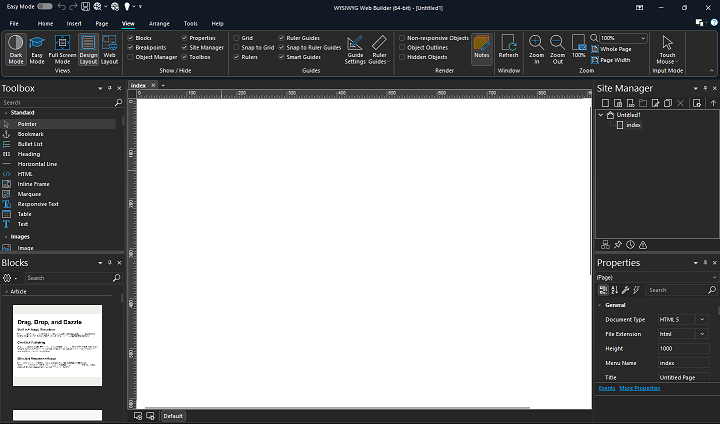
WWB IDE workspace Dark Mode

Post by brimanHTML »

Sorry if this topic has been asked before but I was not finding answer to this specific question

In the IDE I set Dark Mode using the ribbon "Dark Mode" icon

The IDE does go into Dark Mode except the center workspace and the objects added to it and after time it hurts my old eyes :wink:

As hopefully you can see from the attachment that the center workspace stays light mode. How or can we make the IDE 100% Dark Mode?
How can I make the work area for editing pages/adding objects Dark Mode.

TIA :D

Image
User avatar
Pablo
 
Posts: 24187
Joined: Sun Mar 28, 2004 12:00 pm
Location: Europe
Contact:

Re: WWB IDE workspace Dark Mode

Post by Pablo »

The workspace is where you create your website, so you can make the background (page) and objects it any color you want.

https://www.wysiwygwebbuilder.com/page_properties.html
User avatar
brimanHTML
 
 
Posts: 31
Joined: Tue Jul 19, 2022 2:58 pm

Re: WWB IDE workspace Dark Mode

Post by brimanHTML »

Thanks Pablo, makes total sense :D
Post Reply