
AI helps people work faster and more efficiently by reducing the time and effort needed for many tasks, from writing content to coding. With WYSIWYG Web Builder AI, building and managing websites is now much quicker and easier than before, allowing users to get more done with less effort.
WYSIWYG Web Builder AI offers many useful features, including:
- Text Generation: Creates written content for you.
- Text Improvement: Edits text to make it shorter or longer, simpler, fix spelling mistakes, or change the tone.
- Translation: Translates text between different languages.
- Image Generation: Creates images based on written descriptions.
- Image Editing: Modifies images or creates new variations using in-painting and out-painting.
- AI Vision: Understands images and can answer questions like what’s in an image or write captions for websites.
- Background Removal: Automatically removes image backgrounds.
- Code Generation: Creates custom HTML, CSS, and JavaScript code to speed up website development.
Where can I learn more about the AI tools?
Please see these related tutorials:
https://www.wysiwygwebbuilder.com/ai.html
https://www.wysiwygwebbuilder.com/ai_prompts.html
https://www.wysiwygwebbuilder.com/translation.html
New in version 20:
https://www.wysiwygwebbuilder.com/comfyui.html
https://www.wysiwygwebbuilder.com/ollama.html
https://www.wysiwygwebbuilder.com/stabilityai.html
Do I need a subscription?
The AI tools in WYSIWYG Web Builder use third party AI services like OpenAI and Google's AI Studio.
In version 20 and later, you can also run AI locally on your computer for free!
See also "Are there any (free) alternatives to using an OpenAI/Google Studio account?" at the end of this FAQ.
For the use of OpenAI API or Google AI Studio (Gemini) you will need an API key.
If you do not already have an account then you can create it here: https://platform.openai.com/signup and https://aistudio.google.com/
Note that OpenAI API is not the same as a ChatGPT Plus account! Unfortunately, you will currently need a separate account.
Step 1
Create an OpenAI account: https://platform.openai.com/signup
or https://aistudio.google.com/ for Google's AI Studio.
Step 2
Create an API key in the account: https://platform.openai.com/api-keys
The API key can be entered in Tools -> Options -> Artificial Intelligence
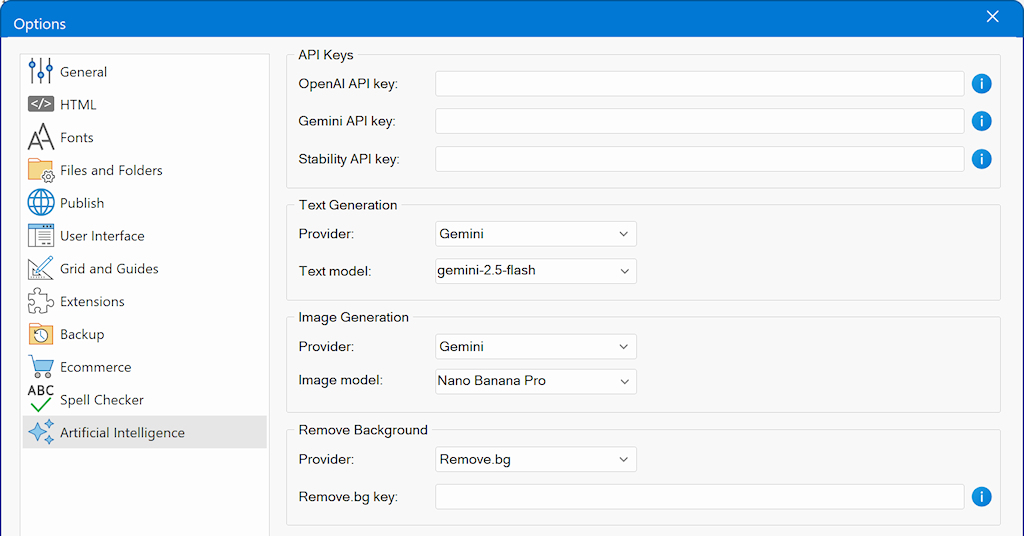
Step 3
Setup the billing information: https://platform.openai.com/account/billing/overview
Here you can buy credits or 'pay-as-you-go'
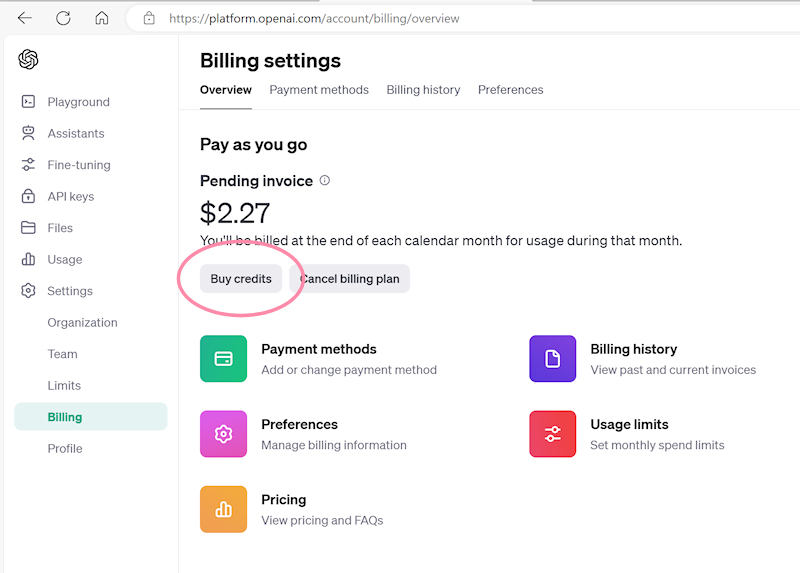
Here's an example bill to give you an idea of the costs:
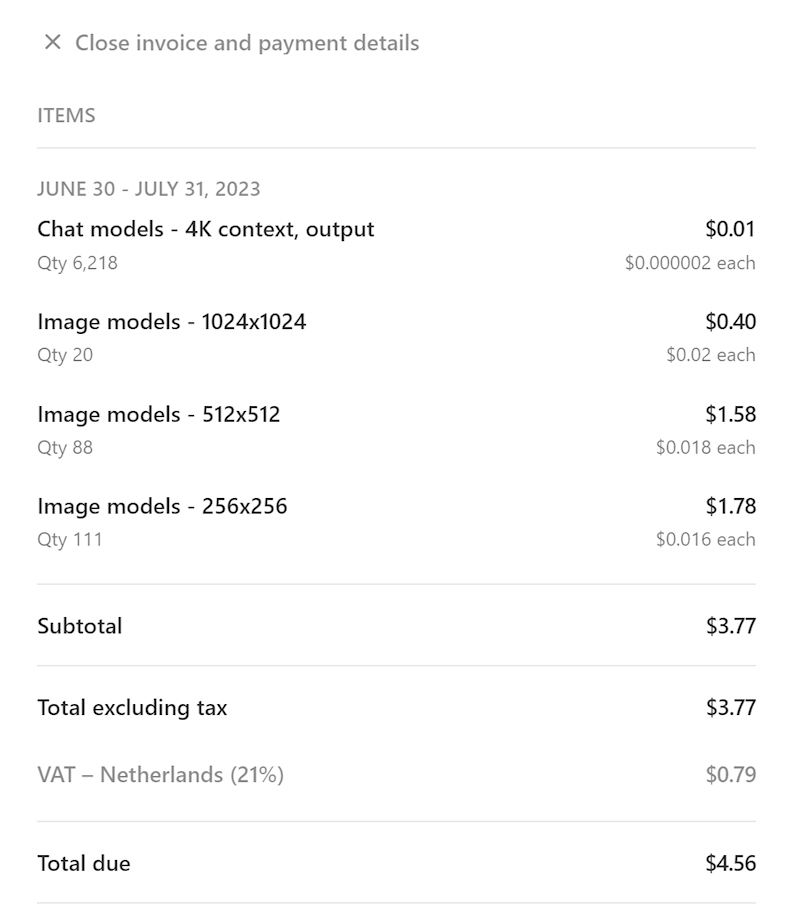
Note that nothing of this payment goes to the creators of WYSIWYG Web Builder, we do not make any profit from this functionality.
We just made it possible to use the functionality in the software.
Are there any limitations for a free OpenAI account?
Unfortunately, a free OpenAI account has limitations. For example, there is limited number of images you can create per minute. The same applies to text.
More details are available here:
https://platform.openai.com/docs/guides/rate-limits/usage-tiers?context=tier-free
Is the ChatGPT API included in a ChatGPT Plus subscription?
No, unfortunately the ChatGPT API and ChatGPT Plus subscription are billed separately.
The API has its pricing, which can be found at https://openai.com/pricing. The ChatGPT Plus subscription covers usage on chat.openai.com only.
"You exceeded your current quota, please check your plan and billing details" error
This error indicates that you have reach a limitation of the (free) account.
For example, you may have generated too much images or text per minute. In that case, try again later or upgrade your current OpenAI plan.
Note that WYSIWYG Web Builder has no control over this. It just displays the error that was received from the OpenAI server.
Here is an overview of all OpenAI errors and their meaning:
https://platform.openai.com/docs/guides/error-codes/api-errors
Which is better: OpenAI, Google AI Studio, or local AI (ComfyUI / Ollama)?
There is no single “best” AI platform, each option has strengths depending on your use case, budget, privacy needs, and hardware. The AI landscape also changes rapidly: a provider that leads today may be surpassed weeks later as new models and features are released.
Commercial cloud AI (OpenAI, Google AI Studio)
Commercial services generally deliver:
- Higher overall quality and consistency
- Faster inference speeds
- Access to the latest large models and multimodal features
- Minimal setup and maintenance. They tend to excel at complex reasoning, coding assistance, image understanding, and large-scale workloads. The trade-offs are recurring costs, usage limits, and reliance on external servers.
Local / self-hosted AI (ComfyUI, Ollama)
Local AI has improved dramatically and continues to close the gap:
- Full control over data and privacy
- No per-request costs after setup
- Works offline and can be highly customizable
- Ideal for experimentation, automation, and hobbyist workflows
For simpler tasks, such as text generation, summarization, translation, or running stable workflows local models often perform very well. However, results may be slower, less consistent, and dependent on your hardware and technical expertise.
How to create better prompts to generate higher quality AI Images?
1. Be specific and detailed in your prompts for better results. Asking for "a monkey" may result in odd images, but requesting "an oil painting of a monkey in the jungle" produces better outcomes.
2. Adjust your expectations; achieving impressive results may require experimentation and refining your prompts. It often takes a few tries with different variations to get the desired outcome.
3. Avoid overly complicated prompts. Including too many characters and details can confuse the AI, leading to messy results. Keep it simple and focused for optimal performance.
There is a dedicated tutorial about AI prompts.
https://www.wysiwygwebbuilder.com/ai_prompts.html
What about privacy?
WYSIWYG Web Builder communicates directly with OpenAI and Google AI Studio using secure (encrypted) connections. Your prompts and requests are sent only to the selected AI provider to generate a response.
WYSIWYG Web Builder itself does not store, log, or transmit your AI input or output to its own servers or to any additional third-party services.
For performance and usability, some data is cached locally on your computer. By default, this cache is stored in:
Documents\WYSIWYG Web Builder\system\ai\
This cached data remains on your system and can be removed manually at any time if needed.
If maximum privacy or offline operation is a priority, you can use local AI solutions (such as ComfyUI or Ollama). In this case, all processing happens entirely on your own machine, and no data is sent over the internet.
Can I view previous generated images?
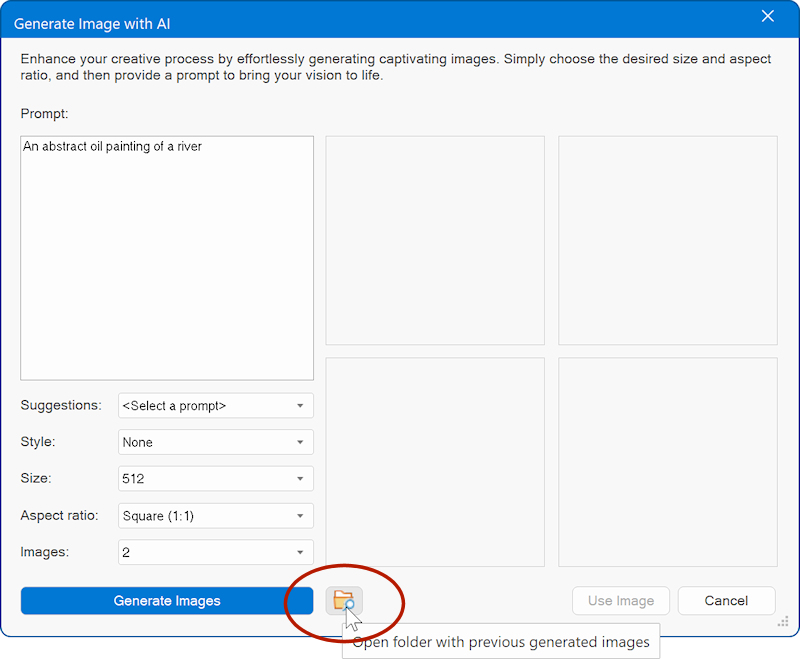
All generated images are saved in the folder Documents\WYSIWYG Web Builder\system\ai\
You can also access previously generated AI content via a shortcut in the 'Generate Image' window.
What languages does WYSIWYG Web Builder AI support?
AI currently supports more than 25 different languages, including English, French, German, Italian, Spanish, Portuguese, Russian, Japanese, Chinese, Korean, Arabic, Hindi, Indonesian, Malay, Thai, Vietnamese, Turkish, Greek, Hebrew, Dutch, Polish, Swedish, Danish, Norwegian, Finnish, Czech, Hungarian, Romanian, Slovak
Are there any copyright issues content generated with WYSIWYG Web Builder AI?
AI-generated images and text can be used on your website freely.
Please visit the OpenAI website for more information about terms-of-use.
https://openai.com/policies/terms-of-use
Which AI models are supported?
WYSIWYG Web Builder AI supports all models that are available in OpenAI, Google AI studio, ComfyUI and Ollama.
If the modal you want to use is not available in the drop-down list, then you can simply type the name in the input box.
The models can be configured in Tools -> Options -> Artificial Intelligence
Are there any free alternatives to using an OpenAI or Google AI Studio account?
In version 20, we have added several alternatives for OpenAI.
- ComfyUI (free alternative for generating images locally, including support for flux, stability)
- Ollama (free alternative for generating text locally)