V 20.0.2 New Features

All WYSIWYG Web Builder support issues that are not covered in the forums below.
Forum rules
IMPORTANT NOTE!!

DO YOU HAVE A QUESTION OR PROBLEM AND WANT QUICK HELP?
THEN PLEASE SHARE A "DEMO" PROJECT.


PLEASE READ THE FORUM RULES BEFORE YOU POST:
http://www.wysiwygwebbuilder.com/forum/viewtopic.php?f=12&t=1901

MUST READ:
http://www.wysiwygwebbuilder.com/getting_started.html
WYSIWYG Web Builder FAQ
Post Reply
User avatar
Starb7
 
 
Posts: 311
Joined: Tue Sep 05, 2006 12:35 pm
Location: Derbyshire

V 20.0.2 New Features

Post by Starb7 »

Hi Pablo

Been trying the new features and to he honest, I am struggling with a couple of them. So, rather than a page of info, do you have any working project we can download to see how you use them, eg how you made the 'demo pages'? Other comments are 'would be nice', and perhaps to add into suggestions?

A working Project to Play with: Glassmorphism - how did you make that page, specifically if you wanted it to be 'responsive' using such as a Layout Grid.
A working Project to Play with: Easy Breakpoints - again when using a Layout Grid.

Suggestion: Overpaste - works well and will save a lot of time but how can I paste it so it opens in a new page? perhaps an Overpaste+ where you hold the option key down when you paste?

I do make use of (a lot, I'm lazy!) the 'Layout Grid' option as this can very easily sort a lot of responsive funtions & formatting without having to use fixed layouts and BreakPoints. The downside of course, is you can't just place items where you want in a Layout Grid - now, that would be nice :)

Great work as always and worth the upgrade cost - thanks for you hard work as always.

Many thanks
Starb
User avatar
Pablo
 
Posts: 24424
Joined: Sun Mar 28, 2004 12:00 pm
Location: Europe
Contact:

Re: V 20.0.2 New Features

Post by Pablo »

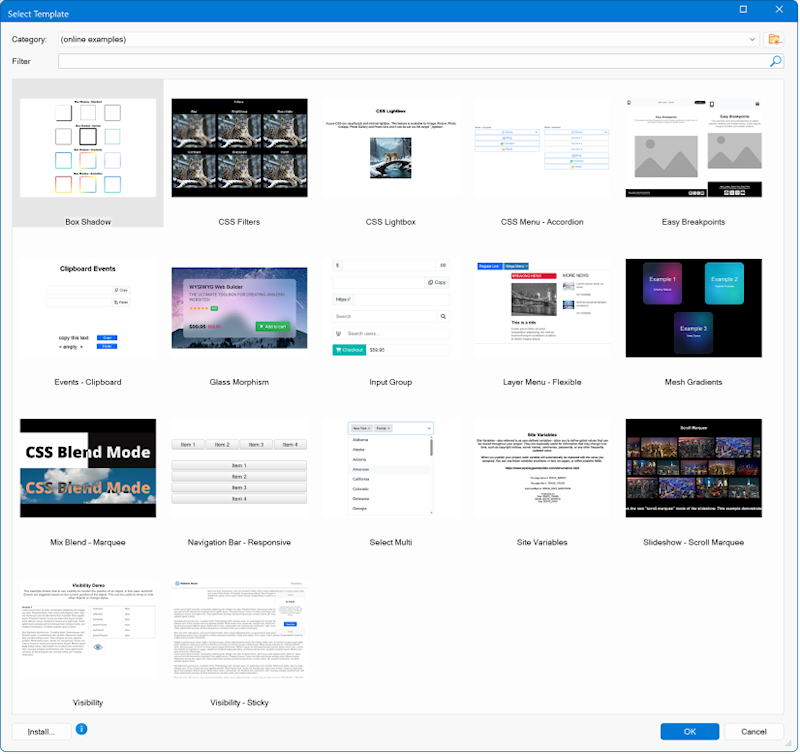
As usual, you can download the examples via Help -> Examples

Image

Also, all new templates use easy breakpoints.
https://wysiwygwebbuilder.com/templates2026.html
but how can I paste it so it opens in a new page? perhaps an Overpaste+ where you hold the option key down when you paste?
There is no shortcut for that, you will need to set this in the properties.
The downside of course, is you can't just place items where you want in a Layout Grid - now, that would be nice :)
Elements cannot be fixed and flexible and the same time. It is either one or the other.
But maybe you can try 'sections'?
https://wysiwygwebbuilder.com/section.html
User avatar
Starb7
 
 
Posts: 311
Joined: Tue Sep 05, 2006 12:35 pm
Location: Derbyshire

Re: V 20.0.2 New Features

Post by Starb7 »

Thank you - very much appreciated.
Post Reply