Check for update

All WYSIWYG Web Builder support issues that are not covered in the forums below.
Forum rules
IMPORTANT NOTE!!

DO YOU HAVE A QUESTION OR PROBLEM AND WANT QUICK HELP?
THEN PLEASE SHARE A "DEMO" PROJECT.


PLEASE READ THE FORUM RULES BEFORE YOU POST:
http://www.wysiwygwebbuilder.com/forum/viewtopic.php?f=12&t=1901

MUST READ:
http://www.wysiwygwebbuilder.com/getting_started.html
WYSIWYG Web Builder FAQ
Post Reply
User avatar
Biju
 
 
Posts: 152
Joined: Thu Mar 10, 2016 7:02 pm
Location: Kerala, INDIA.

Check for update

Post by Biju »

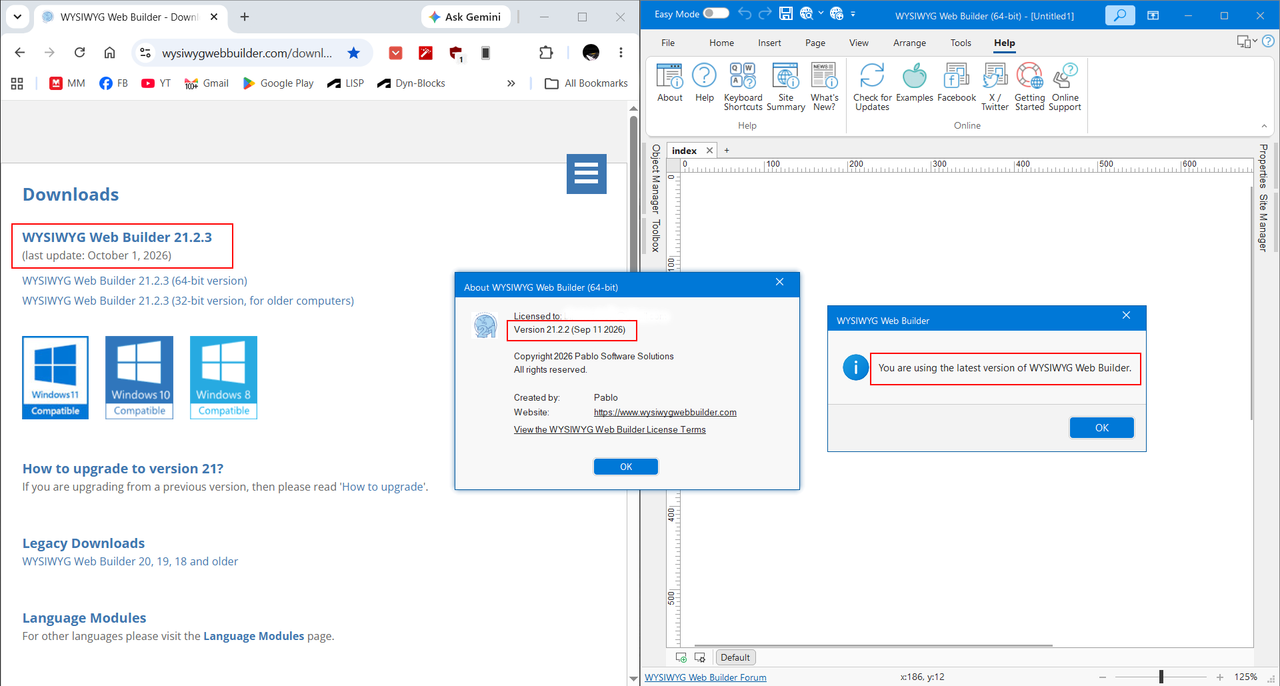
Check for updates showing "You are using the latest version of WYSIWYG Web Builder". But not..
See below the self-explained image:

Image

...it does not display an “Updates are available” message when WYSIWYG Web Builder starts, even though I have enabled the option to check for updates automatically.
~ Remain Curious
and Keep Learning ~

_________________
visit my site
User avatar
Pablo
 
Posts: 24977
Joined: Sun Mar 28, 2004 12:00 pm
Location: Europe
Contact:

Re: Check for update

Post by Pablo »

The “Check for Updates” notification in the software is intentionally delayed by one or more days after each release.
Updates are announced on the forum first, as this allows me to get feedback as quickly as possible in case I have overlooked something or an issue comes up.

If everything looks good, the update notification is then enabled.

This is not a new process; I have been handling updates this way for years.
So, nothing is wrong;)
User avatar
Biju
 
 
Posts: 152
Joined: Thu Mar 10, 2016 7:02 pm
Location: Kerala, INDIA.

Re: Check for update

Post by Biju »

Thanks Pablo..
~ Remain Curious
and Keep Learning ~

_________________
visit my site
Post Reply